 Foblex Flow
Call Center Flow Editor — Now Updated with Angular 20 and Signals
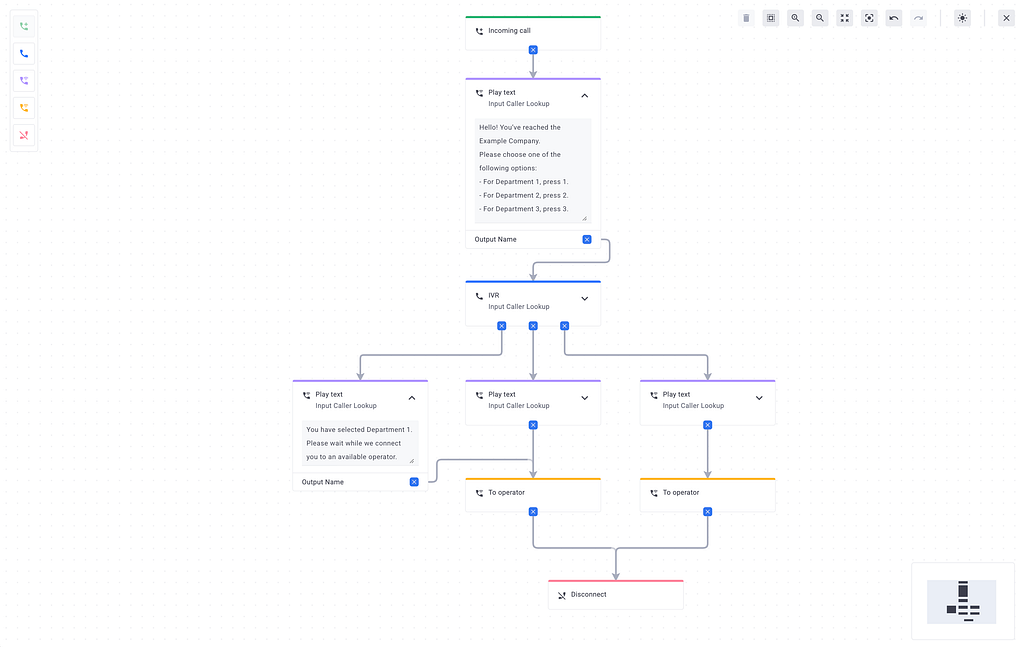
This update revisits a call center flow editor built on top of Foblex Flow and shows how the project benefits from Angular 20, Signals, and a more production-ready editing UX.
The goal stayed the same: let users design call flows visually by dragging nodes and connecting them instead of writing configuration manually.
Since then, Angular has evolved, and so has this project. I wanted to take advantage of Angular 20 and its new Signals API, so I decided to give the editor a proper refresh.
🔥 What’s New
Here’s what changed in this update:
- Migrated the whole project to Angular 20
- Rewritten state management on Signals → no external store, simpler and more reactive
- Added a Light/Dark theme switch for a nicer editing experience
- Added Undo/Redo (finally you can experiment without fear)
- Improved overall UX (zooming, dragging and reconnecting nodes feels smoother)
- Using Angular Material components for the interface
Call Center Flow
Demo & Source
Reflections
Moving everything to Signals simplified the state logic a lot. Undo/redo was much easier to wire up, and persisting state in localStorage became almost trivial.
This was a good reminder that Angular’s ecosystem is evolving quickly — and Signals are already powerful enough to drive fairly complex interactive UIs.
Closing Thoughts
This project started as a small experiment, but it keeps evolving together with Angular. Signals made the code simpler and the editor itself more responsive.
I’m planning to keep polishing it, so feedback is always welcome 🙌
👉 Try the demo: https://foblex.github.io/f-flow-example
And if you find this project useful, consider leaving a ⭐ on GitHub — it really helps!