 Foblex Flow
Inside Foblex Flow — Part 1: Library Architecture and Design Principles
This article explains the architectural choices behind Foblex Flow and why the library is designed as Angular-native interaction infrastructure rather than a full graph data platform.
But if you work with Angular, you’ll quickly face a problem:
- most popular solutions are React-only (e.g., React Flow),
- others are tightly coupled to their own data model,
- or they feel outdated and don’t fit into modern Angular projects.
That’s why we built Foblex Flow — a library that fills this gap.
- Written entirely in Angular.
- Doesn’t dictate how to store your data.
- Provides a flexible interaction layer.
- Based on a clear, event-driven API.
In this series, we’ll look inside the library — how it works, which principles guide its design, and which architectural decisions make it lightweight and universal.
We’ll start with the foundation: architecture and design principles.
https://github.com/Foblex/f-flow
🎯 The Key Idea: Separation of Responsibilities
Most node-based libraries give you everything “out of the box”: a data store, JSON graph, APIs for saving and loading. That’s convenient at first, but becomes a limitation once you try to integrate it into a real application.
Foblex Flow takes a different approach:
- 👉 The library stores only what’s needed for interactivity and rendering,
- 👉 Everything else is left to the user.
What the library stores
- Node positions (x, y) — required for rendering.
- Canvas scale and translate — zoom and panning (defaults: scale = 1, translate = {0,0}).
- Drag session state — current node coordinates, cursor offsets.
- Element selection (selected / unselected) — for highlighting and frames.
- Internal UI states — e.g., snap highlight when connecting nodes.
What the user stores
- Graph structure — which nodes exist, their types and parameters.
- Connection model — which links are allowed, validation rules.
- Node semantics — what a “Webhook”, “AI Generator” or “Parser” node actually does.
- Persistence — saving/loading flows (NgRx, Signals, IndexedDB, Firebase, etc.).
- Visual styles — how nodes and connectors look.
📌 In short: the library handles the UI layer, while your application owns the business logic.
That remains the default stateless architecture. Since v19.1, applications can explicitly install the optional Managed Flow State plugin when they want typed graph records, automatic updates for supported gestures, snapshots and undo/redo. The plugin can own generic graph bookkeeping; business meaning and persistence remain application concerns.
⚡ Event-Driven Model
The golden rule of the stateless Foblex Flow core: the library never mutates your application-owned data silently.
Completed interactions are emitted through the public Angular events:
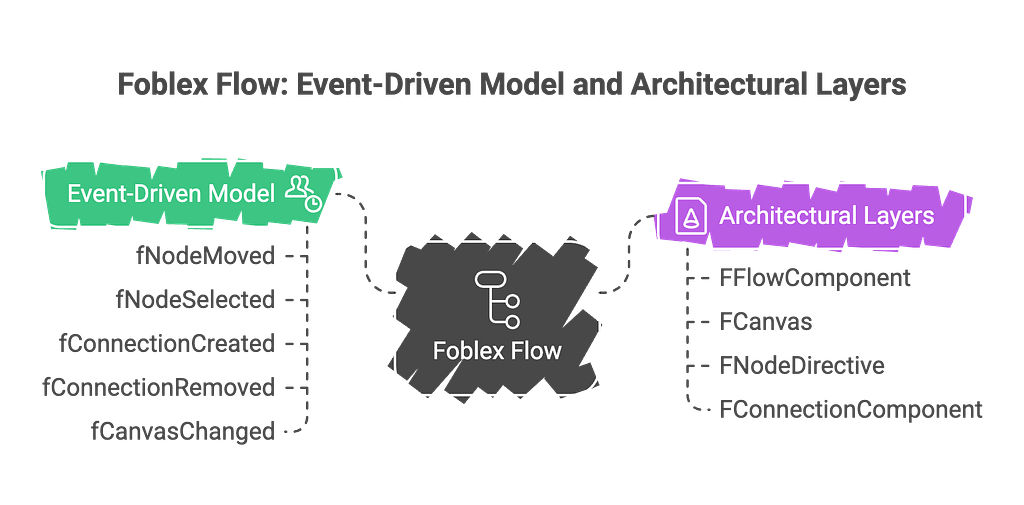
fMoveNodes— nodes or groups finished moving.fSelectionChange— the current node, group, and connection selection changed.fCreateConnection— a new connection was requested.fReassignConnection— an existing endpoint was moved to another connector.fDeleteSelected— deletion of the current selection was requested.fCanvasChange— the canvas position or scale changed.
This means every action is a signal to your application:
“This happened. You decide what to do.”
That makes the library predictable and easy to integrate with any state management — from Signals to NgRx.
🧩 Architectural Layers
We can break down Foblex Flow into four layers:
Flow
The root component (<f-flow>) — coordinates context, events, and canvas state.
Canvas
The workspace: holds all nodes and connections. Manages zoom, pan, and selections.
Nodes
Nodes are not predefined components, but directives you can attach to any Angular element.
fNode— turns an element into a node.fConnector— defines a source, target, bidirectional, or outlet connector.
Connections
An SVG path connecting a source connector to a target connector. Supports Bezier, straight, segmented, and adaptive paths plus custom markers and content.
🔧 Minimal Example
Explicit positions keep the initial layout predictable. If fNodePosition is omitted, the node uses the default origin instead of disappearing.
But where and how you store them (Signals, NgRx, Firestore, a plain service) is entirely up to you.
🛠 Design Principles
1. Minimal Magic
Instead of hiding complexity behind black boxes, the API is transparent: directives and events are explicit.
2. SSR and Zoneless Angular
Foblex Flow supports Angular SSR. Browser-only paths are guarded so they do not execute during server rendering.
3. Performance
- No “global JSON graph” that’s recalculated on each change.
- Scopes many registry updates and connection redraws to affected geometry, while explicit full-redraw APIs remain available.
- Drag-and-drop is optimized for large graphs (hundreds of nodes).
4. Flexibility
- Store flows as JSON if you like.
- Sync with Firebase or GitHub.
- Save to IndexedDB.
The library never dictates your persistence strategy.
📐 Visual Diagram
The diagram illustrates the boundary: Foblex Flow only handles UI state, while your app owns the graph model and business logic.
Managed Flow State is an explicit alternative for the graph-model side of that diagram. It does not move domain rules, validation or persistence into the core, and applications that do not provide it keep the event-driven model unchanged.
🧠 Philosophy: UI Handles Interactivity, Not Data
The core philosophy: Foblex Flow is not a “platform inside a platform.”
It focuses on what it does best — interactive UI.
- The library tells you what the user did.
- Your app decides what it means.
This separation makes the library universal. You can build anything — from workflow editors to no-code chatbot builders.
🚀 Conclusion
Foblex Flow is not a black box — it’s a transparent tool for building node-based UIs in Angular.
- By default, it manages interactivity, not your data.
- Gives you full control over business logic.
- Fits projects of any scale, from simple diagrams to complex low-code platforms.
When manual event wiring is unnecessary, provideFFlow(withFlowState()) adds the optional managed graph store without making it a requirement for every editor.
In the next part, we’ll dive into the drag-and-drop engine:
- unifying mouse, touch, and pointer events,
- the internal IPointerEvent structure,
- how FDraggableDirective works,
- and how plugins enable extensions like resize, rotate, and external drop.